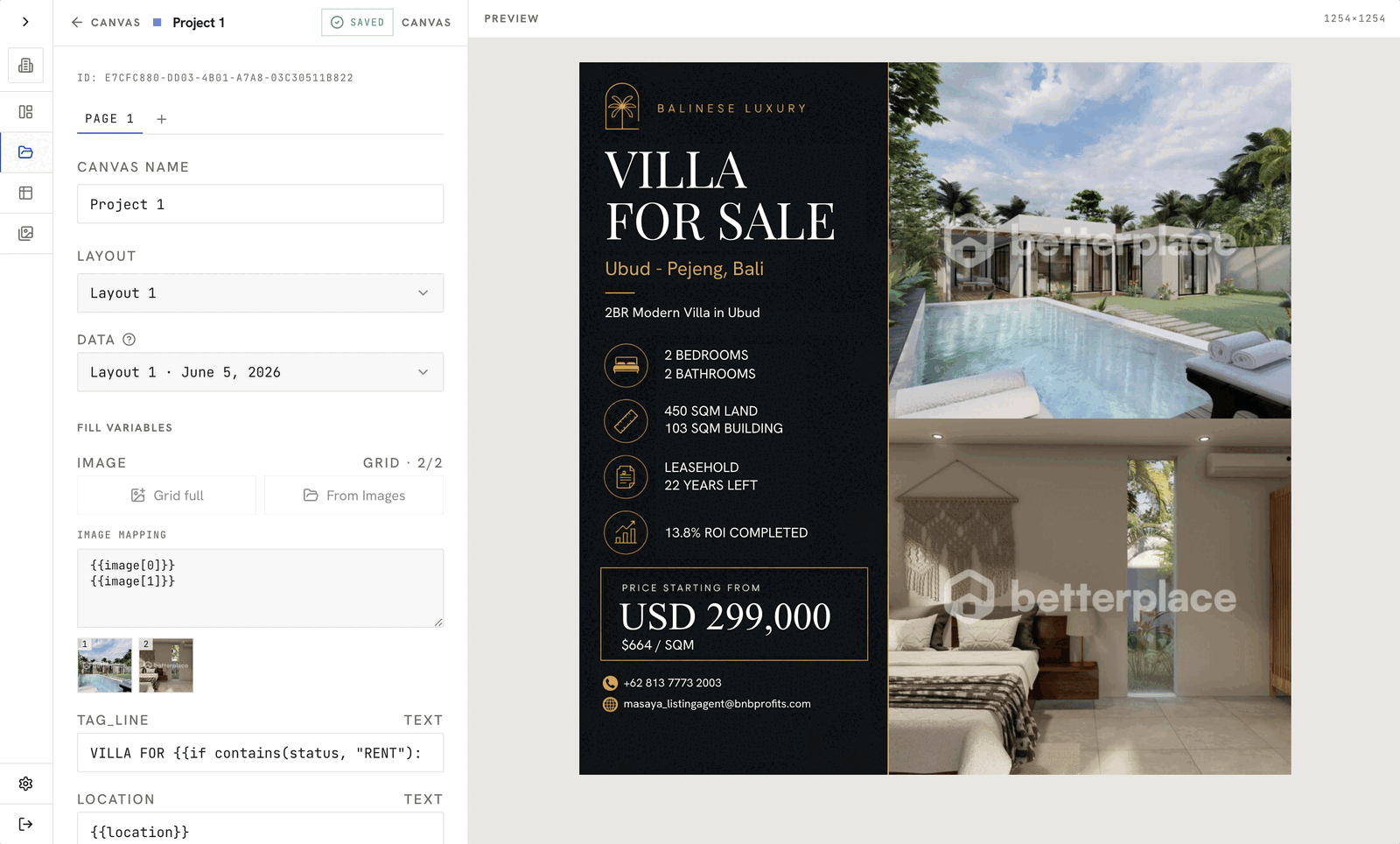
In the middle of working on a real estate data scraping project for one of my client, I caught myself thinking “Turning all these listings into a social media post I believe would take so much time” then I ask a question: “If the data is already clean and structured, why does turning it into a social media catalog still take so much manual work?”
That question became the spark for this entire experiment.
Instead of just shipping the scraping script and moving on, I wanted to see how far I could push the idea of treating design like any other programmable system. If I can turn source code into a build artifact, why can’t I turn a dataset into a batch of finished catalog images?
So I followed the thread the way I usually do: I opened my browser, tested a few assumptions, and started asking better questions.
What if design worked more like a build pipeline?
At some point during the project, I paused and imagined the workflow from the marketer’s perspective.
They already have:
- A spreadsheet or database of listings
- Standard brand guidelines
- Repetitive, recurring design patterns (catalog posts, carousels, highlight cards)
Yet every time they need a campaign, they have to:
- Copy data out of the source
- Paste it into a design tool
- Manually position text and images
- Export assets one by one
It felt wrong.
The “what if” questions started stacking up:
- What if a catalog could design itself from a dataset?
- What if I could treat design templates like code, and images like build outputs?
- What if a marketing team could generate a week’s worth of visuals without opening a design tool at all?
With those questions in my head, I jumped into my favorite AI assistant and typed something like:
“What Node package can I use to build a browser-based design tool?”
I didn’t have a fully formed product in mind yet. I just knew I wanted:
- A canvas I could control programmatically
- A way to bind data fields into dynamic elements
- A pipeline that could receive data and emit final images
AI helped me quickly articulate what I was actually trying to build: not another drag-and-drop designer, but a programmable design engine.
From idea to first prototype
My first goal was not to make it beautiful or feature-complete. The goal was simple:
“Can I send structured data to an engine and get usable images back, with minimal human involvement?”
I decided to frame this as an experiment rather than a product:
- Take real estate data as the first test dataset
- Build a basic template system for a catalog layout
- Wire everything through a simple API
- See what breaks
I leaned on my existing skills and comfort zone:
- Scrapy for data scraping
- FastAPI for the backend
- Vite + React.js for the frontend
- Konva.js for the interactive canvas
- PostgreSQL for persistence
- AWS S3 for generated image storage
The idea was to test what a future “bulk design” service could look like. No clients yet, no promises-just curiosity and a working prototype.
Turning curiosity into a pipeline
Once the idea felt solid enough, I started assembling the system piece by piece.
Stack overview
- Scrapy to gather and normalize listing data (titles, prices, locations, descriptions, images).
- FastAPI to expose:
- Template management endpoints
- Image generation endpoints
- Simple admin utilities
- PostgreSQL to store:
- Templates
- Mappings between data fields and template elements
- Generation logs
- Vite + React + Konva.js to build:
- A web UI for designing templates
- An interactive canvas where text and image placeholders can be placed, resized, and styled
- AWS S3 as the final repository for generated images.
Core concept: one template, many outputs
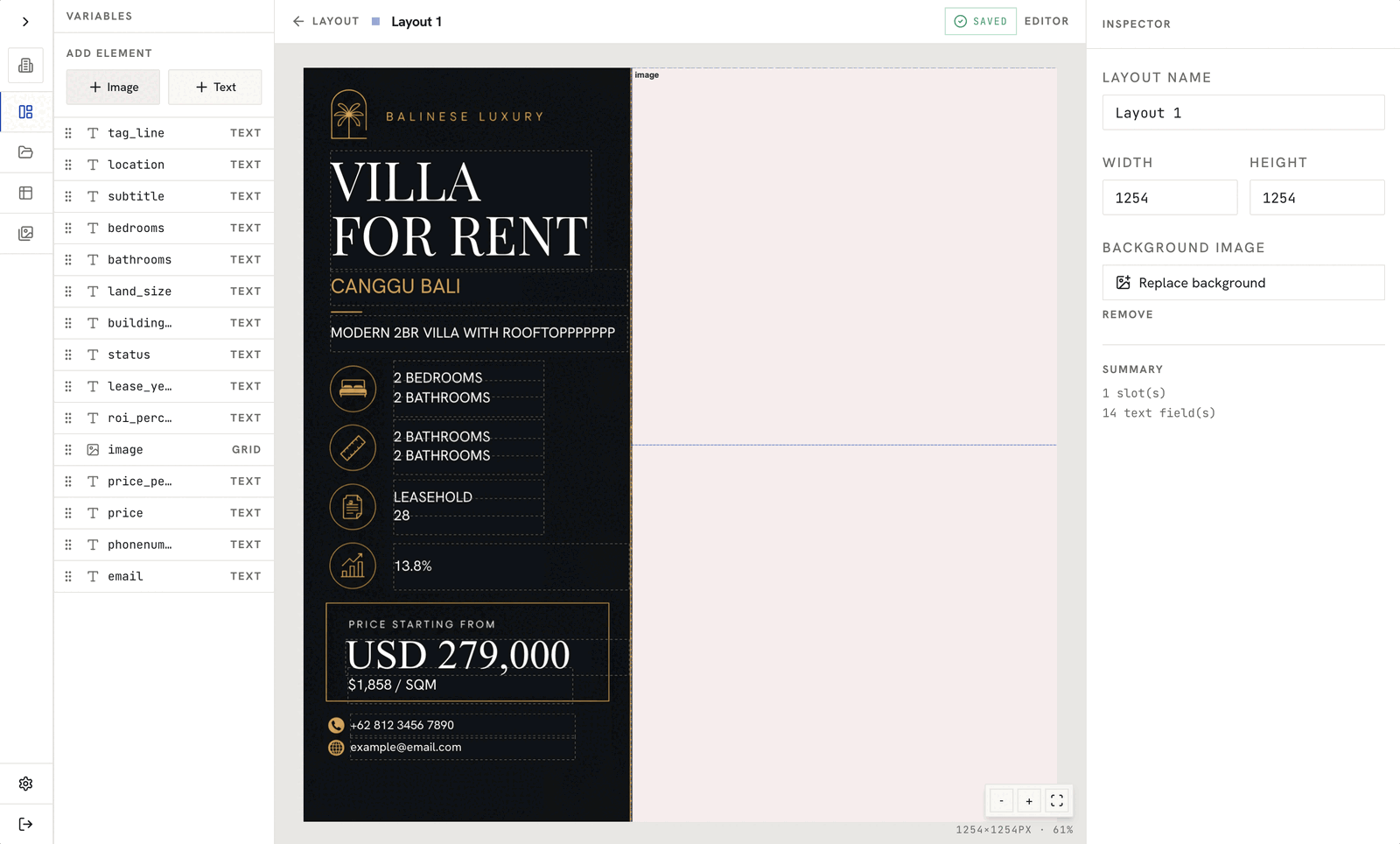
The main design idea was:
- A user (likely a marketing team member) designs a single template.
- Inside that template, they define dynamic elements:
- Text placeholders (for example,
{{title}},{{price}},{{location}}) - Image placeholders (for example, property photo)
- Text placeholders (for example,
- Once this template is saved, it becomes an “engine”:
- You send it a record (or batch of records) via API.
- It returns generated images, one per data row.
In other words:
- Design once.
- Connect data.
- Generate at scale.
The data pipeline
%%{init: {"theme": "base", "themeVariables": {"primaryColor": "#f3f4f6", "primaryBorderColor": "#6b7280", "primaryTextColor": "rgb(54, 55, 55)", "lineColor": "#6b7280", "secondaryColor": "#f9fafb", "tertiaryColor": "#ffffff"}}}%%
flowchart TD
  A["Scrapy collects listings"] --> B[("Structured listing data")]
  B --> C["Clean and normalize data"]
  C --> C1["Remove excessive text"]
  C --> C2["Standardize price, location, and fields"]
  C1 --> D["Scraping pipeline"]
  C2 --> D
  D --> F["Batch of data records"]
  F --> H["Design engine API"]
  H --> I["Map fields into placeholders"]
  I --> J["Render images with Canvas 2D"]
  J --> K["Upload generated images to AWS S3"]
  K --> L["Return image URLs or paths"]
From the real estate project’s perspective, here’s how the pipeline worked:
- Scrapy collects listings and stores them in a structured format.
- Data is cleaned and normalized:
- Remove excessive text
- Standardize fields (price formats, locations, etc.)
- The scraping pipeline then calls the design engine API:
- POST
/api/v1/layout/{template_id}/datawith:- A batch of data records as the payload
- POST
- The design engine:
- Maps data fields into placeholder elements
- Uses Canvas 2D server-side rendering to produce images
- Uploads generated images to S3
- Returns URLs or paths
I also added an AI-powered text normalization step:
- Some fields (like descriptions) were too long for the design constraints.
- AI helped summarize or truncate text while preserving key information.
- This kept layouts clean and prevented overflow issues.
The goal wasn’t to make the “perfect” copy, but to respect the visual constraints of the template.
What the experiment showed
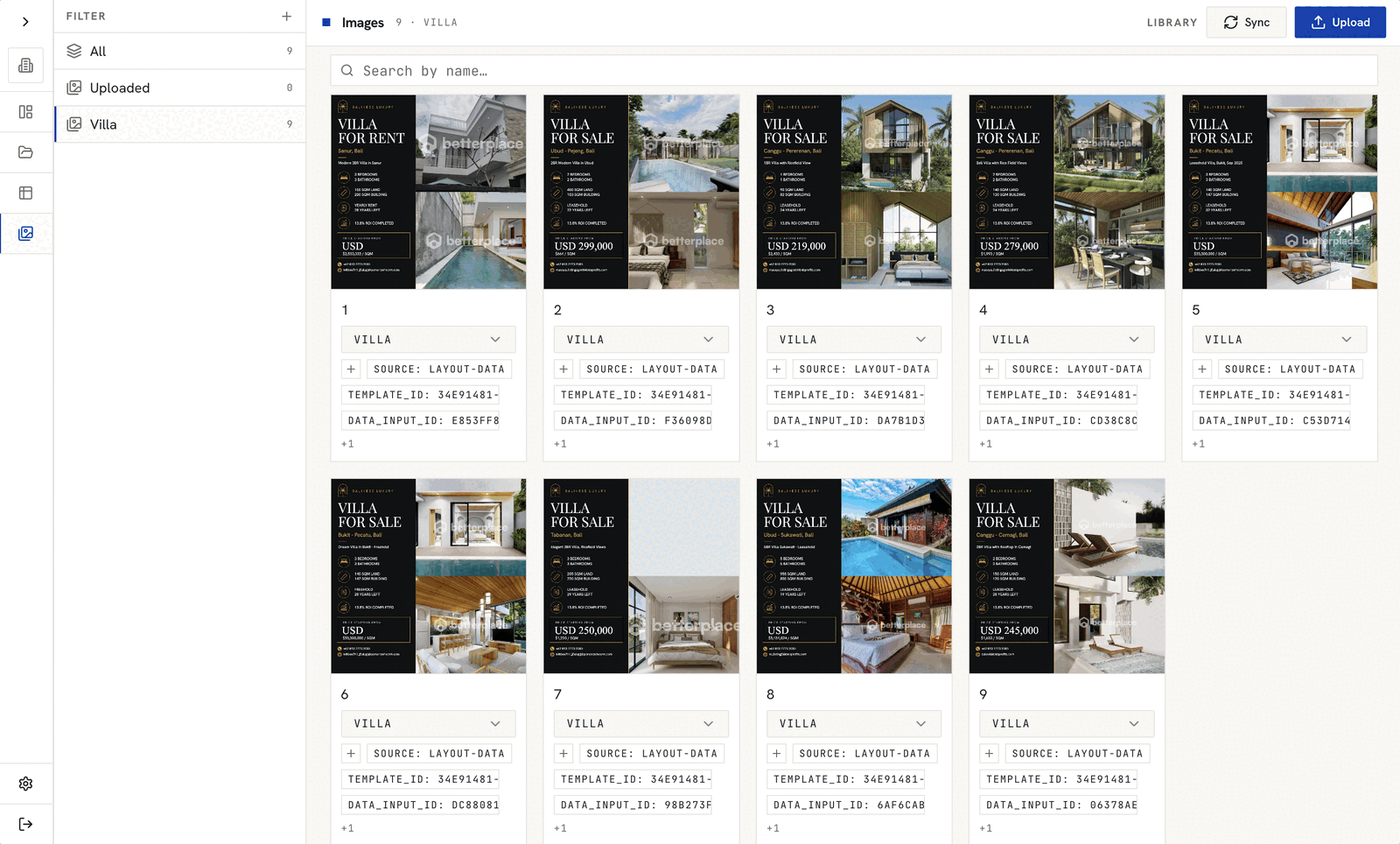
This was never meant to be a polished SaaS yet. It was a proof of possibility. But the results were promising.
On the technical side
- The pipeline successfully turned a real, scraped dataset into:
- A batch of catalog-like social media images
- Generated through an API, not a design tool
- After the initial template was set:
- Generating new batches required zero manual design work
- It behaved like a build job: run pipeline in, assets out
This confirmed the core hypothesis:
“Design for repetitive content can be treated like a programmable system.”
On the workflow side
The experiment also revealed some practical observations:
- Data quality is everything:
- Clean, structured fields produce clean designs.
- Messy data immediately surfaces as ugly layouts.
- Templates are leverage:
- The more thought you put into one solid template, the more value you get from every batch.
- The system is not for designers:
- Designers might still prefer their tool of choice.
- This engine is more useful for marketing teams, content ops, or agencies that care about:
- Volume
- Consistency
- Turnaround time
Instead of replacing creative work, the engine handled the repetitive, high-volume layer of design.
Beyond one project
What started as a side curiosity during a freelance scraping gig ended up as something worth building.
The real estate dataset was just a convenient first test. But the pattern is far more general:
- Product catalogs for e-commerce
- Event posters from a registration list
- Certificates from a CSV of attendee names
- Menu updates from a restaurant database
- Social snippets from blog metadata
- Social Media content from news
Anywhere there’s structured data and recurring visual patterns, this approach can apply.
The bigger realization was this:
“Design automation isn’t just about saving time. It’s about reframing design as an interface over data.”
Instead of dragging elements around for every single asset, we can:
- Define a robust template.
- Bind it to a data source.
- Let the system handle the heavy lifting.
And curiosity doesn’t stop here. This experiment raises new questions:
- How far can we push personalization at scale?
- How could non-technical users plug in their own data sources?
- What would it look like as a self-serve product instead of a private tool?
For now, this project lives in that interesting space between experiment and internal case study. It’s not a public product yet, but it’s a working proof that:
- A dataset can become a catalog.
- An API can become a design engine.
This is just one experiment, but it’s already reshaping how I think about design, automation, and what’s possible when you treat visuals like build artifacts instead of one-off files.
If this feels close to a workflow inside your business, book 20-min consulting call. I also offer automation consulting for teams that want to turn repetitive work into a working system.